👮♂️ Virtual Admins
To use this feature you must have the 🟣 PREMIUM plan or higher.
Virtual Admins - Sometimes necessary protection
Your channel has gotten to the point where it is no longer manageable by just one person. It is therefore necessary to delegate work to an administrator who, with the right permissions, can help you with the creation of posts in the channel.
But what if this eventual administrator wants to do you a wrong?
He could decide to ban every single user subscribed to the channel.
In fact, Telegram does not in any way allow you to decide whether or not an administrator can ban other users from the channel. What to do then?
With the Virtual Admins feature you can promote a user to a virtual admin rather than a standard one. At that point that user will be able to choose: send, modify and / or delete posts through Channel Help, thus helping you to manage the channel without having the possibility to ban users who are subscribed to the channel.
Configuration
So let's see how to proceed: go to the "Users" menu then click on "Virtual admins".

Once in this menu you can add a virtual admin by pressing the button.

To do this, you can send the username or the id. Otherwise it is sufficient to forward to the bot any message sent by the user that we want to promote.
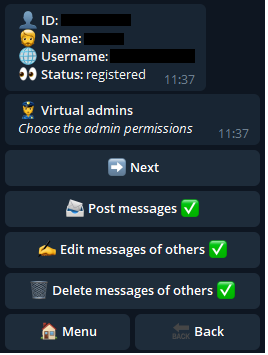
Once done, the bot will send the user's situation in the channel and their general information. If the user is subscribed to the channel and is not a normal administrator, it will be possible to decide his permissions, which have the same meaning as the standard Telegram permissions.
Once the permissions have been decided and pressed on "Next" the virtual admin will appear in the main menu, from which it will be possible to change the permissions by clicking on the name or remove it by clicking on the trash can.